Managing crew availability, confirmations and assignment changes can quickly become complex during live productions and event planning. Crew members respond at different times, planners adjust schedules, replacements may be needed, and project requirements can change throughout the workflow.
Without a clear overview, teams often end up relying on spreadsheets, phone calls, emails or messaging apps to keep track of crew updates — making coordination slower and more difficult.
SquidWeb helps planners and coordinators keep everything organised with a real-time crew status system directly integrated into each project.
Booking status overview for every crew member
Each crew assignment can display a specific status depending on the current workflow stage, making it easier to instantly understand the situation of every crew member involved in a project.
These booking workflow statuses help planners instantly understand the assignment stage of every crew item inside a project.
Statuses can change automatically through workflow automation, planner actions, client interactions or crew member responses.
S͟t͟a͟n͟d͟a͟r͟d͟ ͟p͟r͟o͟j͟e͟c͟t͟ ͟c͟r͟e͟w͟ ͟i͟t͟e͟m͟ ͟s͟t͟a͟t͟u͟s͟e͟s
- Design — crew item is still in planning and not yet visible to the client
- Requested — a request has been sent to the crew member for confirmation through the mobile app
- SpareToFix — special request status used when a crew member was previously confirmed as spare crew and is later requested for an active assignment
- Confirmed — assignment confirmed directly by the planner
- ConfirmedWeb — assignment confirmed by the crew member through the mobile app
- Has Changed — assignment details changed after the last confirmation
- Has been cancelled — assignment has been cancelled
S͟t͟a͟t͟u͟s͟e͟s͟ ͟g͟e͟n͟e͟r͟a͟t͟e͟d͟ ͟b͟y͟ ͟a͟u͟t͟o͟m͟a͟t͟i͟o͟n
- Suggested — crew member suggested automatically by the automation process
S͟t͟a͟t͟u͟s͟e͟s͟ ͟t͟r͟i͟g͟g͟e͟r͟e͟d͟ ͟b͟y͟ ͟c͟l͟i͟e͟n͟t͟ ͟a͟c͟t͟i͟o͟n͟s
- Client Added — project crew item added directly by the client through the mobile app
- ClientRequest — client requested a specific crew member through the mobile app
- PlannerRequest — planner requested a specific crew member through the mobile app
S͟t͟a͟t͟u͟s͟e͟s͟ ͟t͟r͟i͟g͟g͟e͟r͟e͟d͟ ͟b͟y͟ ͟c͟r͟e͟w͟ ͟m͟e͟m͟b͟e͟r͟ ͟a͟c͟t͟i͟o͟n͟s
- CrewRequest — crew member requested to join a specific project crew item
Because every status is clearly visible inside the project overview, planners can react faster and reduce the need for manual follow-ups.
Color indicators and real-time updates make it easier to quickly identify booking progress and operational activity directly from the planning overview.
Activity status overview for every crew member
Once crew assignments move beyond the booking workflow, SquidWeb also supports operational activity tracking directly inside the planning workflow.
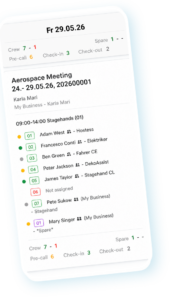
These activity statuses help planners and clients monitor the real-time operational progress of crew members during live productions and event operations.
Operational activity indicators make it easier to instantly identify whether crew members have completed important workflow steps such as:
-
Yellow indicator — Pre-call complete
-
Green indicator — Check-in completed
-
Grey indicator — Check-out completed
Because these activity updates are visible directly inside the planning calendar and project overview, planners can quickly identify pending arrivals, missing check-ins or completed assignments without relying on separate calls or manual follow-ups.
These activity indicators are visible directly inside the planning calendar and mobile workflows, helping planners maintain a live operational overview across active projects.
Faster coordination during live operations
Crew planning is constantly evolving, especially in fast-moving event and production environments. Last-minute changes, cancellations or additional staffing requests can happen at any moment.
With real-time status updates, teams can quickly see when:
- crew members accept or decline jobs
- schedules or assignments change
- additional crew is required
- replacements need to be organised
- confirmations are still pending
- clients request specific crew members
- crew members proactively request assignments
This creates a more transparent and structured workflow for planners and coordinators while helping reduce communication delays across the team.
Connected web and mobile workflows
Statuses are synchronised between the SquidWeb web platform and mobile app, allowing planners, clients and crew members to stay aligned throughout the entire project lifecycle.
Crew members can receive requests and manage assignments directly from the mobile app, while planners maintain a live overview of every update inside the web platform.
Operational activity indicators such as pre-calls, check-ins and check-outs are also synchronised between the web platform, planning calendar and mobile workflows, helping planners and clients maintain real-time visibility across active projects.
A clearer overview for complex crew planning
By centralising crew statuses directly inside the project workflow, SquidWeb helps teams reduce confusion, improve visibility and coordinate staffing more efficiently.
Whether managing small teams or large-scale productions, real-time crew statuses make it easier to keep projects organised from planning to execution.