Bank transfers can be sent alongside the creation of receipts in SquidWeb to pay incoming invoices quickly and easily.
All bank transfers made from SquidWeb are stored and accessible from the bank transfers page. Transaction reports can also be taken directly from SquidWeb and turned into a compressed file to be processed in accounting software.
Mobile users can find a copy of their contract, view their monthly working hour values and download all of their personal documents via the app, this short guide will show you where these features can be found.
9
1
https://squidweb.info/wp-content/uploads/Sin-titulo-600-x-180-px-300x90.png00SuperAdministratorhttps://squidweb.info/wp-content/uploads/Sin-titulo-600-x-180-px-300x90.pngSuperAdministrator2019-08-01 15:50:402021-12-08 10:24:10Contract and documents
After the project is finished and all project documents have been returned, the hours must be checked and added to the PCI’s so the invoice can be created and the crew can be paid correctly.
https://squidweb.info/wp-content/uploads/Sin-titulo-600-x-180-px-300x90.png00SuperAdministratorhttps://squidweb.info/wp-content/uploads/Sin-titulo-600-x-180-px-300x90.pngSuperAdministrator2019-07-29 15:52:152021-12-09 10:05:03Closing a project
The Planning calendar provides a daily break down of all project crews working over a 7 day period. The week is organized into columns, one for each day of the week. The columns are then further organized into crew containers, ordered chronologically with the earliest project crew at the top.
Each crew container displays all the details of a single project crew as well as how many of the crew members are booked, requested or missing. All containers are linked to the project they represent, clicking on a crew container header or crew member will open that project directly.
The Crew Planner page is the all in one tool for all the staff in your company.
Crew calendar, Profiles, Ratings, Bookings, Vacations accounts and more!
The Crew Planner has everything you need to organize and plan the whole team.
The MainPanel displays the crew calendar, an interactive and color coded crew planners dream, and the SidePanel is filled with all the information you can legal access about which ever member of the crew is selected.
The SquidWeb invoice warning system alerts you when an invoice is overdue and provides incremental reminders to notify the client to pay the outstanding amount.
The report can be created and sent directly from the invoice list and emailed to the contact or robots can be set up to trigger the email.
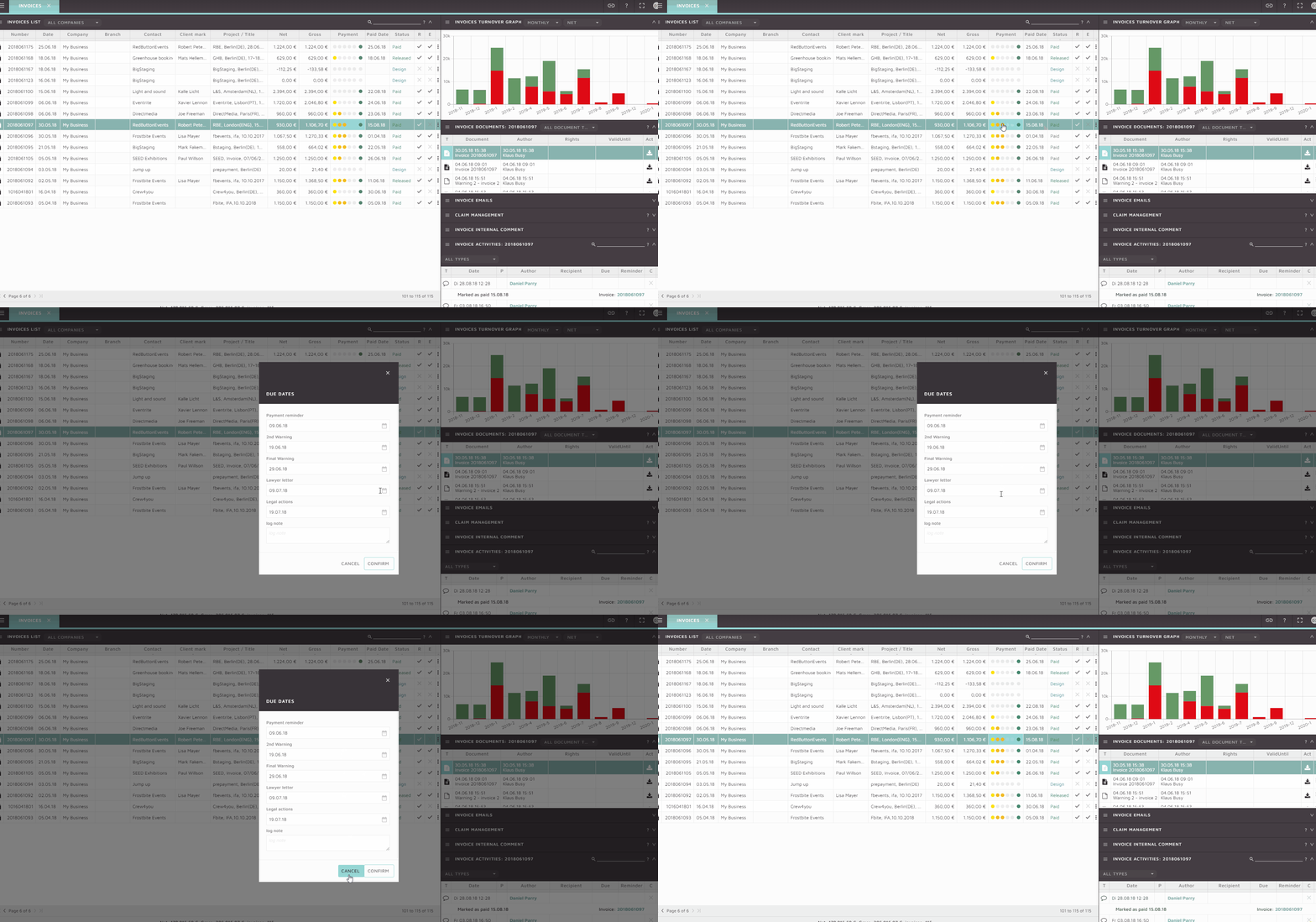
The intervals at which these warnings are triggered is defined in company settings or individually for each client in the claim management, any invoice that has not been paid at the end of the first set period will be marked in the invoice list “Payment” column and the first warning report will be sent. This will continue until the invoice is marked as paid or all warning steps have been exhausted. The payment column has 5 due date positions: 3 for payment reminders and 2 for legal action.
The dates at which the warnings are due may also be manually edited for each invoice by selecting the “change due dates” option from the invoice list action menu:
This is also useful for example when a payment agreement has been made with a client where the standard due date intervals do not apply. Setting the expected date for each payment reminder will avoid unnecessary communication being sent to a client.
Full details on how the invoice warning system works can be found in our tutorial video here:
This tutorial show you how to create a receipt and process an incoming invoice through to completion. Incoming invoices can be uploaded to a receipt and stored for accounting records.
Bank transfers can be made directly from a receipt and its status tracked for all users to see.
When your project is finished, you need to create an invoice for your client. Preset templates and built-in calculating make creating an invoice quick and simple.
SquidWeb will alert you if there are any mistakes on your invoice, so even the new guy won’t make mistakes.
https://squidweb.info/wp-content/uploads/Sin-titulo-600-x-180-px-300x90.png00SuperAdministratorhttps://squidweb.info/wp-content/uploads/Sin-titulo-600-x-180-px-300x90.pngSuperAdministrator2019-07-22 16:10:592021-12-09 10:09:24Creating an invoice from a project
We may request cookies to be set on your device. We use cookies to let us know when you visit our websites, how you interact with us, to enrich your user experience, and to customize your relationship with our website.
Click on the different category headings to find out more. You can also change some of your preferences. Note that blocking some types of cookies may impact your experience on our websites and the services we are able to offer.
Essential Website Cookies
These cookies are strictly necessary to provide you with services available through our website and to use some of its features.
Because these cookies are strictly necessary to deliver the website, refusing them will have impact how our site functions. You always can block or delete cookies by changing your browser settings and force blocking all cookies on this website. But this will always prompt you to accept/refuse cookies when revisiting our site.
We fully respect if you want to refuse cookies but to avoid asking you again and again kindly allow us to store a cookie for that. You are free to opt out any time or opt in for other cookies to get a better experience. If you refuse cookies we will remove all set cookies in our domain.
We provide you with a list of stored cookies on your computer in our domain so you can check what we stored. Due to security reasons we are not able to show or modify cookies from other domains. You can check these in your browser security settings.
Google Analytics Cookies
These cookies collect information that is used either in aggregate form to help us understand how our website is being used or how effective our marketing campaigns are, or to help us customize our website and application for you in order to enhance your experience.
If you do not want that we track your visit to our site you can disable tracking in your browser here:
Other external services
We also use different external services like Google Webfonts, Google Maps, and external Video providers. Since these providers may collect personal data like your IP address we allow you to block them here. Please be aware that this might heavily reduce the functionality and appearance of our site. Changes will take effect once you reload the page.
Google Webfont Settings:
Google Map Settings:
Google reCaptcha Settings:
Vimeo and Youtube video embeds:
Other cookies
The following cookies are also needed - You can choose if you want to allow them:
Privacy Policy
You can read about our cookies and privacy settings in detail on our Privacy Policy Page.